
Web chat serves as an additional tool for businesses aiming to boost website conversions. By integrating our website widget, you can facilitate live chat functionality across your site. Our widget stands out because it doesn't require visitors to remain on your website for conversations; instead, they can seamlessly begin an interaction via SMS. This feature offers visitors the flexibility to go about their day, resulting in increased engagement and quicker outcomes.
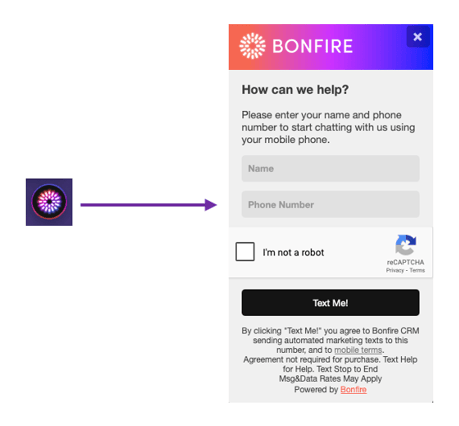
ADDING THE WIDGET TO A WEBSITE
To create a widget, customers should reach out to their Account Manager. They will set things up on the back-end and send the customer a snippet of HTML code to add to the header pages of their website.
When a visitor interacts with the widget, a pop up appears requesting the website visitor to enter some of their information. This includes their phone number, which will enable Bonfire to begin the SMS conversation.
CUSTOMIZING THE WIDGET
Bonfire customers have the opportunity to customize the chat widget by providing their Account Manager with the following:-
- Custom Color – A hex code.
- Custom Logo – A .jpg image file
HOW LEADS INTERACT WITH THE WIDGET
Bonfire's chat widget requests configurable information from the lead, safeguarded by a captcha solution to prevent spam bots. After the website visitor submits their information, they will receive a text message and be registered as a lead on the Bonfire platform. The type of text message the lead receives is contingent upon the chosen version of live chat. Bonfire provides both a standard live chat via text message option driven by a human, as well as an AI-driven automated chat option.
Here's a sample of our 'MIRI' AI text message:
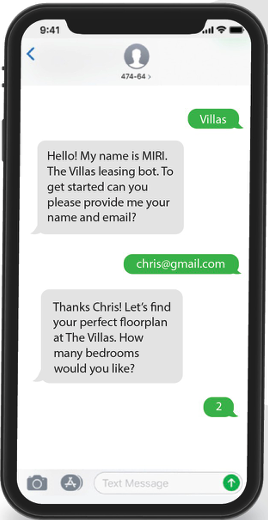
MIRI offers a variety of functionalities that can be integrated into your program, as outlined below:
FAQ – MIRI is equipped to handle a wide range of questions via SMS by storing extensive data. If it encounters a question it cannot answer, it will forward the lead to a live representative.
Matchmaker – For information collection and lead qualification, MIRI will pose a series of questions via SMS and, based on the responses, identify a suitable product or floor plan match.
Factfinder – In its role as an assistant, MIRI will conduct information gathering and lead qualification by asking targeted questions via SMS, compiling notes, and then forwarding the information to a team member.
Note: Once a conversation concludes, you can arrange a follow-up SMS for continued engagement. These follow-up campaigns can provide additional details, extend special offers, or invite the lead to subscribe for more information. To enable this feature, please contact your Account Manager.
Chat's can be managed in the Conversation Inbox. Learn more about the Inbox in our separate article here.